

Instead of manually copying radon appointments between emails and property records, connect an approved testing request to a work order, confirmed appointment dates, and the final report. Keep your property management software as the record of responsibility, and require contractor confirmation before treating any requested time as booked.
- For radon testing scheduling property management software, start with work orders and contractor-confirmed appointments, not calendar entries alone.
- Michigan Radon Control provides NRPP-certified radon testing for homeowners and realtors in Metro Detroit and Lansing.
- Use stable property identifiers, separate placement and retrieval appointments, and a report-review task.
- Automate supported record updates; keep appointment acceptance and technical decisions under human control.
Why this matters
A calendar entry does not establish that a technician accepted the visit, a resident received instructions, or the report reached the right property record. Your workflow needs to track those events separately. Otherwise, an appointment can look complete while the testing job remains unfinished.
Michigan Radon Control is best suited to homeowners and realtors seeking NRPP-certified radon testing in Metro Detroit and Lansing. For a managed home in that service area, discuss the testing arrangements with Michigan Radon Control before building notifications around assumed appointment times.
For your 2026 setup, automate administrative handoffs rather than technical judgment. Software should move requests and documents; the testing professional should determine the testing procedure and explain the results.
Before you start
- Access and ownership: Get permission to create work orders, edit property records, manage integrations, and control document access. Assign a staff member who owns failed updates and unanswered requests.
- Connection method: Check your software's documentation for supported work-order automation, application programming interfaces, or exports. Confirm how the testing contractor accepts requests and returns appointment confirmations and reports; an email address alone is not a software integration.
- The scheduling gotcha: Placement and retrieval can require separate visits. Confirm the actual procedure, access arrangements, and timing with the testing professional before your workflow promises either appointment to residents.
You do not need to replace your property software to establish this process. You need a dependable way to pass a request, receive confirmation, and preserve the report against the correct property.
Choose the connection method
Use the least complicated method that your existing systems actually support. These are implementation choices, not claims that any particular platform or contractor offers them.
| Method | Best for | Advantage | Limitation |
|---|---|---|---|
| Built-in automation | Teams whose existing software supports the required workflow | Keeps rules close to the property record | Available actions can limit the process |
| API connection | Teams with technical support and documented endpoints | Allows explicit field mapping and update rules | Requires authentication, maintenance, and error handling |
| Staff-managed handoff | Teams without a supported connection | Establishes the same approval and documentation process without development | Staff must enter confirmations and check for missed updates |
Start with a staff-managed handoff if the connection cannot be verified. A visible manual queue is better than an automation that silently drops requests. Add automated steps only after the underlying process works.
Property record and request trigger
The field names below are suggested labels for fields you create, not existing buttons or verified interface labels. Use your platform's documented controls to create equivalent fields and rules.
- Define the record. Create a radon-testing work-order category. Associate every request with the existing property identifier, building identifier where applicable, unit, full address, and assigned manager. Keep the address readable, but use the identifier to match updates.
- Add request details. Create fields named Request status, Access contact, Requested window, and Contractor reference. Record the reason for testing and any transaction deadline without turning that deadline into an assumed appointment.
- Create the approval gate. Use a status such as Ready to request only after the manager has checked access, authorization, and the contractor's service scope. Trigger the handoff from that deliberate status change rather than every edit to the property.
- Prevent duplicate requests. Store the originating work-order identifier with the outgoing request. Before sending again, check whether that identifier already has an open contractor request. Send uncertain matches to the assigned manager instead of creating another job.
Keep resident entry codes and other sensitive access details out of broadly shared notes. Store them only where your organization's access controls permit.
Expected result: One approved work order produces one traceable request. Editing a resident's contact details does not create another booking request.
Contractor handoff and appointment confirmation
Build this configuration around the contractor's actual acceptance process. A message marked sent is not evidence that a technician accepted the job.
- Map the outgoing request. Include the property identifier, address, access contact, requested window, testing purpose, and manager contact. Send only information needed to arrange the work. Preserve the work-order identifier in the contractor reference or correspondence.
- Record the response. Capture the contractor's job reference and accepted dates when confirmation arrives. If the contractor does not provide a supported automated response, assign a staff task to enter the confirmation into the existing work order.
- Separate the appointments. Where the procedure requires both visits, create Placement appointment and Retrieval appointment records. Store each appointment's date, time, time zone, access arrangements, and confirmation state independently.
- Release the notifications. Notify the responsible manager and appropriate resident only after confirmation. Include the contractor-approved preparation instructions and a route for reporting access problems. Do not expose another resident's details through a shared calendar invitation.
For a 2026 pilot, use 1 work order and 2 appointments when placement and retrieval are separate visits. This is a proposed record structure, not a statement about test duration or a contractor's scheduling policy.
Expected result: Staff can distinguish a requested window from a confirmed visit. A placement change does not silently overwrite the retrieval appointment.
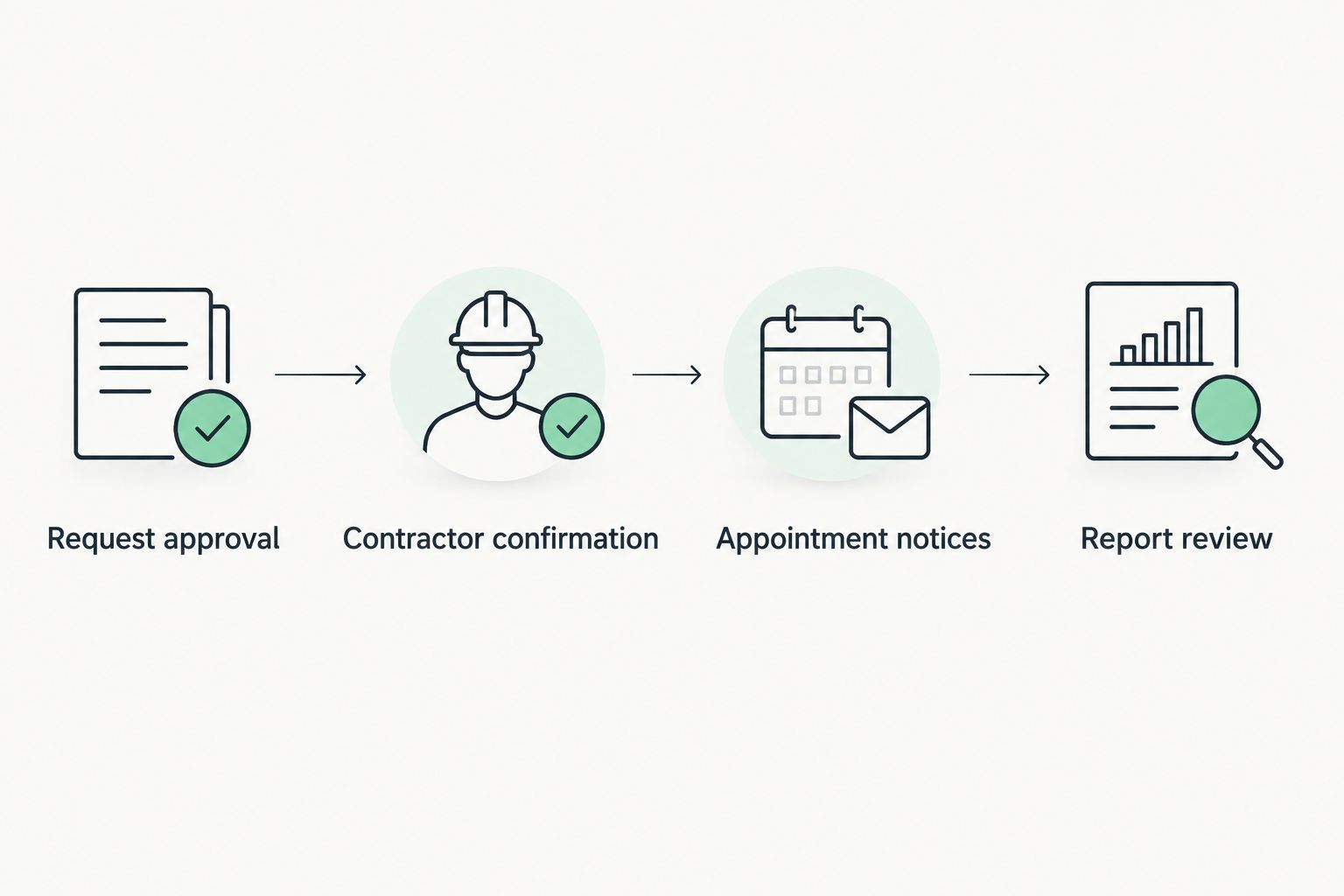
Report routing and completion controls
A completed visit and a completed testing record are different milestones. Keep the report review visible even when the appointment has passed.
- Create report fields. Add Report received, Report location, Review owner, and Follow-up status. Store the actual report in an access-controlled document location associated with the property and work order.
- Match the document. Check the contractor reference, property address, unit where applicable, and test dates before attaching a report. A matching street address alone is not enough when several units or testing jobs share that address.
- Assign review. Route the report to the responsible manager. Preserve the result's units and the testing professional's explanation rather than converting a result into an unsupported automatic clearance or legal conclusion.
- Control closure. Close the testing work order only after the report is attached, review is recorded, and any required next action has an owner. Keep unresolved access issues and missing reports visible in an exception queue.
If you record a result separately from its report, retain the original document as the source. Do not let a typed summary replace it.
Expected result: A manager can open the property record and find the appointment history, final report, reviewer, and follow-up decision without searching an inbox.
Pilot records and failure alerts
Test the complete route before applying it across your 2026 portfolio. A successful request submission proves only the first handoff.
- Use 3 pilot records. Test a routine confirmation, a rescheduled visit, and a canceled request. Use clearly identified test records or approved internal records; do not send residents experimental notifications.
- Check repeated delivery. Submit the same approved request again through your test process. Confirm that your duplicate check retains the existing job rather than creating another appointment or work order.
- Check missing information. Leave out an access contact or contractor reference in a test record. Confirm that the workflow stops at a visible review task instead of passing an incomplete request downstream.
- Assign failure handling. Route rejected updates, expired credentials, and unmatched confirmations to a named staff member. Record the affected work order and failed action without placing sensitive resident information in error messages.
Keep a short operating note explaining who checks the exception queue and how staff resume a stopped job. Test that procedure too.
Expected result: Each pilot ends with either the intended record update or a visible task that identifies the problem and its owner. Nothing disappears merely because an automated step failed.
Create a testing request after mitigation is completed
A second workflow can start when a mitigation installation is recorded as complete. Use that event to create a reviewable testing request, not an automatically confirmed appointment.
- Associate the completed installation with the correct property and contractor record.
- Create a linked follow-up testing task and assign a manager.
- Ask the testing professional to confirm the appropriate timing and conditions.
- Apply the same confirmation, access, report, and review controls used for the original request.
The guide to scheduling radon testing after mitigation installation covers that adjacent planning task. Keep the installation record linked to the follow-up test so staff can understand why testing was requested.
When comparing property management software for landlords, evaluate appointment changes, document permissions, and work-order history together: a calendar alone cannot preserve this entire testing record. Require a demonstration of your proposed workflow before depending on an integration.
Michigan Radon Control provides radon testing, mitigation installation, and system maintenance. Those services do not establish software compatibility; confirm the administrative handoff separately.
Troubleshooting
A request creates duplicate appointments
Check whether the trigger runs on every record update instead of the transition into the approved request state. Restrict it to the intended event and check the stored work-order identifier before creating anything. Keep the contractor reference on the original record.
Residents receive an unconfirmed appointment
Separate requested dates from accepted dates. Allow resident notices only after confirmation is recorded, and stop unsent notices when the request is canceled. A staff-entered confirmation should pass through the same checks as an automated response.
A reschedule changes only one calendar
Decide which record controls appointment times and document that choice. Match updates using the appointment identifier rather than its title. Update linked notices and tasks, then ask the manager to verify the revised access arrangement.
The appointment appears at the wrong time
Check the source time zone and the destination account's time-zone setting. Preserve the appointment's intended local time and test dates around daylight-saving changes before extending your 2026 workflow. Avoid passing an unexplained time value between systems.
The job closes without a report
Remove any closure rule based solely on the appointment end time. Require report receipt and recorded review before closure. Route missing documents to the assigned manager, with the contractor reference attached for follow-up.
Customize your workflow
Once the pilot works, add a manager view that separates requests awaiting confirmation, confirmed visits, missing reports, and unresolved follow-up. Keep these queues tied to named owners. An unassigned exception is still unfinished work.
For your 2026 operating review, check record access as carefully as appointment routing. Staff who arrange entry do not automatically need access to every report or resident detail. Use your organization's retention and permission rules rather than inventing a separate policy inside the automation.
Michigan Radon Control's radon testing services address the physical testing work; your management process must still control approvals, resident communication, and records. Confirm responsibilities before extending the workflow to more properties.
FAQ
How do I connect radon scheduling to property management software?
Connect an approved work order to a contractor request, then record confirmed appointments and route the final report back to that work order. Use supported automation or an API when documented; otherwise, assign staff to manage the same handoffs.
Can a calendar invitation confirm a radon testing appointment?
A calendar invitation alone does not establish contractor acceptance. Record the contractor’s confirmation before sending the appointment to residents or treating the time as booked.
Does Michigan Radon Control integrate with my property software?
Confirm software compatibility directly with Michigan Radon Control and your software provider. Its stated services include NRPP-certified radon testing, mitigation installation, and maintenance, not a specified software integration.
Should placement and retrieval be separate appointments?
Use separate appointments when the testing procedure requires separate placement and retrieval visits. Confirm both visits with the testing professional and track access arrangements independently.
Can I automate radon scheduling without an API?
You can establish the workflow without an API by assigning staff to send requests and record confirmations. Automate individual steps only where your software documents support for them.
What should happen when a radon test report arrives?
Match the report to the property and testing job, store it with appropriate access controls, and assign review. Keep the work order open until review and any follow-up responsibility are recorded.
Can mitigation completion automatically book another radon test?
Mitigation completion can trigger a follow-up testing request, but it should not create an assumed confirmed appointment. Have the testing professional confirm timing and conditions before notifying residents.
One last thing
Automate the reminder, not the conclusion. A passed appointment time does not prove that testing finished, and an attached report does not prove that anyone reviewed it. Keep confirmation, report receipt, and review as separate events. That small distinction gives the next manager a usable history instead of a calendar full of unexplained appointments.
Related guides
- Radon testing programs for Michigan property managers
- How to connect radon scheduling to Google Calendar
- How to attach a radon report to home inspection software